


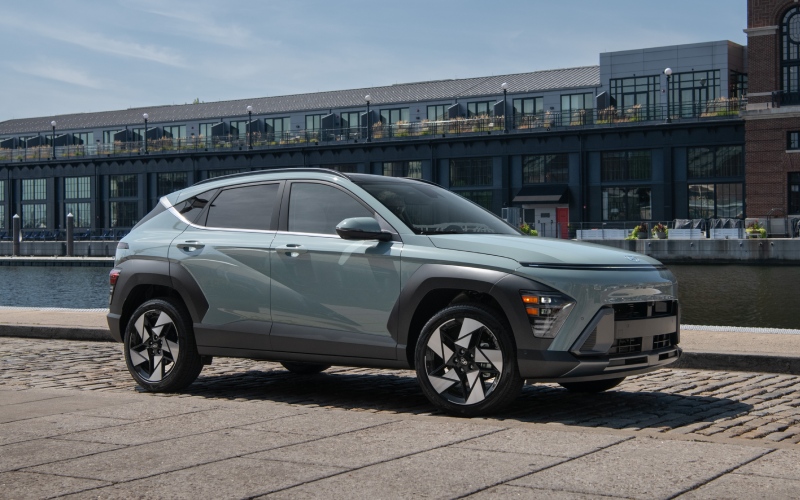
Jones Bel Air Hyundai - Tight Parking around Towson, MD? How the 2027 Hyundai KONA’s Smart Parking Tech Makes It Simple
Parallel spaces on York Road, crowded garages near Towson Town Center, and surprise tight spots around campus can make parking feel like a chore. The 2027 Hyundai KONA turns those everyday challenges into quick, low-stress moments, thanks to a suite of available features that help you see more and do more—sometimes even from outside the vehicle. If you’re exploring a compact SUV that handles commuting and parking with equal poise, the latest KONA deserves your full attention.
Why Parking Feels Easier in the 2027 KONA
It starts with confidence-boosting visibility. The available Surround View Monitor stitches multiple camera angles into a single, overhead-style image right on the KONA’s 12.3-inch display. Think of it as a reliable spotter when you’re easing into a garage space at lunchtime or rolling out of a curb space on Allegheny Avenue with limited sight lines. Clear visual guidance makes it simpler to position your KONA exactly where you want it.
Next, combine that visibility with precise, gentle cues. On the Limited trim, Parking Distance Warning – Forward/Side/Reverse adds contour-style alerts that adapt to your angle and proximity. The tone escalation helps you judge distance without craning your neck or second-guessing where the front corners are. This is a thoughtful layer of support when every inch matters.
Remote Smart Parking Assist: The Game-Changer
The feature that gets the most double-takes is available Remote Smart Parking Assist. Imagine lining up nearly straight, stepping out with the key fob, and guiding your KONA into a tight space while you stay outside—then bringing it back out the same way. That’s RSPA. It’s especially handy when someone parks close to your doors or you’re working with a narrow townhouse driveway. Paired with Surround View Monitor, it turns the toughest parking scenarios into calm, controlled maneuvers.
Importantly, the system is designed for thoughtful, deliberate use. You stay in control while the KONA handles the careful inching, and built-in safeguards help keep movements slow and measured. It won’t turn parking into a stunt. It simply removes the awkward contortions that tight quarters often demand.
Big-Screen Clarity, Small-Footprint Agility
The standard 12.3-inch touchscreen is more than a place for maps—it’s a large, legible canvas for camera views and parking guides. Crisp resolution helps you interpret angles quickly, see curb edges, and understand where your wheels will land next. Because every 2027 KONA includes this generous display, you don’t need to special-order a screen upgrade just to make the most of parking tech.
Meanwhile, the KONA’s compact turning circle—just 34.8 feet curb-to-curb—makes up for a lot of real-world challenges. You’ll feel it whenever you pull a three-point turn on a narrow residential street or swing into a diagonal spot with fewer steering adjustments.
Everyday Tech That Complements Parking
Parking stress often isn’t just about the space—it’s about the busy moments before and after. The KONA meets that reality with smart technology aimed at reducing friction throughout your day.
- Wireless smartphone integration: Every KONA supports wireless Apple CarPlay and Android Auto on a 12.3-inch touchscreen, so you can keep your phone in your bag while you maneuver in or out of a garage.
- Wireless device charging: Available wireless charging keeps you powered up while you focus on visual cues and positioning.
- Rear USB-C power: Passengers can keep devices charged without reaching up front—no tangled cords when you’re loading or unloading in tight spots.
- Rear View Monitor with guidance: Standard reversing visuals with dynamic guidance add everyday reassurance.
Collectively, these details reduce the clutter and distractions that can make parking feel fussy, helping you keep your attention where it matters.
Which KONA Trim Is Right for Parking Tech?
If your driving includes frequent dense parking—think Town Center ramps, lots around Towson University, or narrow neighborhood streets—the Limited trim is the clear choice. It adds the Surround View Monitor, Parking Distance Warning – Forward/Side/Reverse, and Remote Smart Parking Assist, along with upscale touches like an Auto-Dimming rearview mirror and Bose premium audio. You’ll get the full tech suite that pairs most directly with parking comfort.
That said, every KONA includes helpful elements out of the box. The standard 12.3-inch display, Rear View Monitor with parking guidance, and the SUV’s nimble turning radius make day-to-day parking easier even if you don’t select the top trim.
Frequently Asked Questions:
Do I need to choose AWD to get the KONA’s parking tech?
No. The available parking features are tied to trim level and options, not to front-wheel drive versus all-wheel drive. Choose the drivetrain that fits your driving routes and weather confidence, then select the trim with the camera and assist features you want.
Can Remote Smart Parking Assist handle parallel spaces?
RSPA is designed to help move the KONA forward and backward in tight spaces while you control it from outside the vehicle. For conventional parallel parking, you’ll typically position the vehicle from the driver’s seat using the standard camera views and available Parking Distance Warning; RSPA shines when you need to carefully pull in or out of a confined spot.
Is the big 12.3-inch screen standard, or do I need an upgrade?
The 12.3-inch touchscreen is standard across all 2027 KONA trims, and it’s your hub for reversing guidance and, on equipped trims, the Surround View Monitor. That means you benefit from a large, clear interface even if you don’t choose the highest trim.
Will the parking systems work in dimly lit garages?
The camera-based systems and Parking Distance Warning are designed to assist in a range of everyday conditions, including indoor parking structures. As always, use the tools as an aid—maintain awareness and adjust driving as visibility changes.
Does the KONA include other features that help during busy commutes?
Yes. Most trims include Smart Cruise Control with Stop & Go, easing highway merges and creeping traffic. The KONA also brings robust standard active safety, including Forward Collision-Avoidance Assist with Pedestrian/Cyclist/JT/DO Detection and Lane Following Assist, to help support confidence before you even begin to park.
For Towson-area drivers, the 2027 KONA’s combination of a standard big-screen interface, precise low-speed maneuvering aids, and the optional convenience of Remote Smart Parking Assist adds up to a compact SUV that fits daily life. Crisp visuals, gentle cues, and the ability to guide the vehicle remotely turn tricky parking into a predictable routine—right when the midday rush is peaking or evening events are wrapping up.
If you’re narrowing your shortlist, consider how often you park in tight spaces and which features you’ll use most. The Limited trim bundles those premium assists alongside comfort upgrades, while every KONA retains the nimble dynamics and practical cabin that make it easy to live with day after day.
When you’re ready to see parking tech in action, stop by for a hands-on walkthrough and a short route that includes realistic garage and curb scenarios. We are here to help you configure the right trim for your routes and routines, serving Towson, Owings Mills, and Clarksville. Jones Bel Air Hyundai
Request more 2027 Hyundai KONA information
Categories:
Hyundai Kona
