


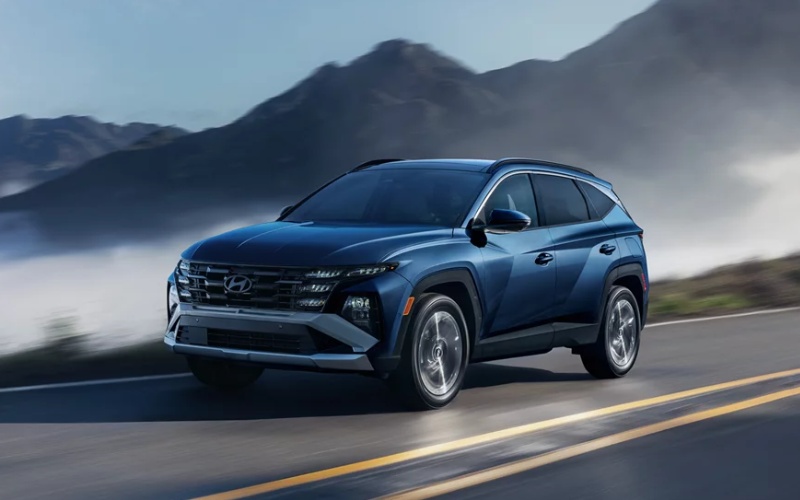
Jones Bel Air Hyundai - How the 2026 Hyundai Tucson’s Panoramic Curved Display Simplifies Daily Driving around Owings Mills, MD
The 2026 Hyundai Tucson’s available panoramic curved display fuses the 12.3-inch touchscreen with the available 12.3-inch digital instrument cluster for a sweeping, driver-focused view that streamlines daily driving around Owings Mills, MD. This elegant interface brings essential details forward without distraction — navigation cues, audio, calls, and key vehicle data live within easy reach, so your eyes spend more time on Reisterstown Road and the I-795 corridor. It is more than a screen upgrade; it is a systems rethink that pairs responsive graphics with Hyundai’s thoughtful ergonomics, so routine tasks feel natural from the first mile.
Smartphone pairing is effortless with Wireless Android Auto™ and Apple CarPlay®, and the layout adapts for turn-by-turn directions, quick-access media tiles, and proactive prompts that anticipate what you need next. The Tucson’s approach reduces tap counts by grouping logical functions and presenting context-aware options — like recently used apps or nearby fuel and coffee — for a smooth flow through daily errands and commutes. Add Bluelink+ remote features, and you can precondition the cabin or lock the doors from a compatible smartphone before you even step outside — especially helpful during summer heat or winter chill.
- Unified visibility: Key driving and infotainment details live together on a sweeping display.
- Fast familiarity: Logical menus and large icons reduce tap counts and distractions.
- Seamless pairing: Wireless smartphone mirroring launches quickly and stays stable.
- Future-ready: Over-the-air update capability helps keep software current.
Navigation-based Smart Cruise Control with Curve Control, available on select trims, complements the panoramic curved display by proactively adjusting speed when entering posted zones or curved highway sections. When paired with available Highway Driving Assist, the Tucson can help maintain a set distance from traffic and assist with centering the vehicle in its lane — an excellent companion for longer stretches between Owings Mills and weekend getaways to the mountains. The net effect is confidence — your most-used features appear where you expect them, and supportive driver aids help reduce fatigue on busy days.
For families, the display’s clarity benefits everyone. Big, legible icons make it simple to swap playlists or pull up navigation, so the front passenger can help with wayfinding, while the driver maintains a steady focus. The available hands-free smart liftgate and generous cargo space — up to 74.8 cu ft — pair with the display’s quick-access functions to make school drop-offs, grocery runs, and sports gear juggling feel more organized and less hurried. If you choose an available hybrid powertrain, the interface also gives intuitive feedback on energy flow and driving efficiency, reinforcing smooth habits without extra fuss.
Hyundai Digital Key 2 adds a layer of convenience by letting you use a compatible smartphone to unlock, start, and share access to your Tucson, with status updates available in Bluelink+. That means fewer pocket searches and more get-up-and-go when you are coordinating multiple drivers. Add available features like Remote Smart Parking Assist on upper trims, and the Tucson can even help you pull into or back out of tight spaces at the press of a Smart Key button — a real reassurance in crowded lots around shopping centers.
At Jones Bel Air Hyundai — serving Towson, Owings Mills, and Clarksville — our product specialists demonstrate the panoramic curved display in real time and tailor settings for your routine. We walk through wireless pairing, show you the most useful widgets for your commute, and set up driver profiles, so the Tucson’s interface reflects your preferences from day one. That extra attention helps the technology feel genuinely helpful, not just impressive on a spec sheet.
Frequently Asked Questions:
Is the panoramic curved display standard on all trims?
The Tucson features a standard 12.3-inch touchscreen across trims, with the panoramic curved display and 12.3-inch digital instrument cluster available on select models.
Does the display support wired and wireless smartphone connections?
Wireless Android Auto™ and Apple CarPlay® are supported; a wired connection may be used for charging or where applicable by trim.
Will software get better over time?
Over-the-air update capability for multimedia and, where equipped, navigation helps keep the system current with feature refinements.
How does the display work with driver assists?
Graphics and alerts integrate with Hyundai SmartSense features, clearly showing lane-keeping status, following gaps, and navigation-based prompts to reduce surprises.
When you are ready to see how the Tucson’s display elevates daily driving, our team builds a test route to highlight real-world use — pairing your phone, setting preferred driver aids, and showing how the system prioritizes what matters most in motion. That hands-on time is the surest way to confirm whether this interface fits your day-to-day rhythm.
Visit us to explore trims and available packages, and to learn how the 2026 Tucson’s panoramic curved display harmonizes with practical features like a hands-free smart liftgate, available HTRAC All Wheel Drive, and a flexible cargo area — a refined blend of simplicity and capability.
Jones Bel Air Hyundai is here to tailor the details so your technology helps you drive, not the other way around.
Request more 2026 Hyundai Tucson information
Categories:
Hyundai Tucson
