


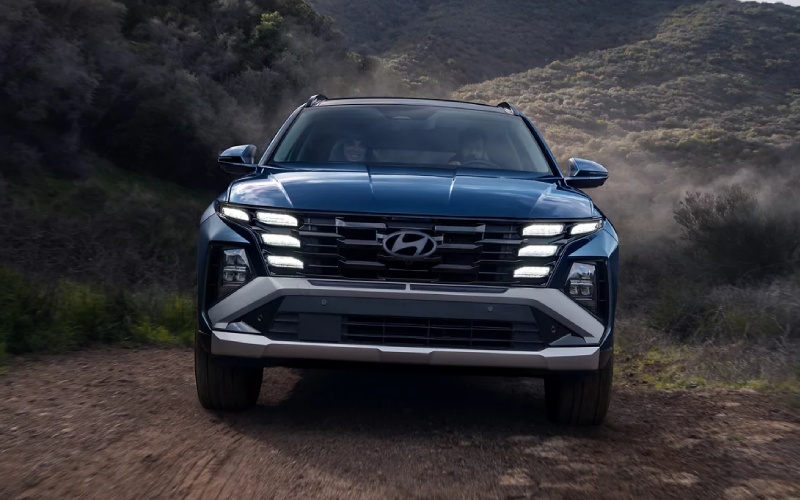
Jones Bel Air Hyundai - How the 2026 Hyundai Tucson’s SmartSense Safety Fits Dundalk, MD Traffic
The 2026 Hyundai Tucson was designed for real-world driving, and that shows when you face the daily pace on Merritt Boulevard, North Point Boulevard, or the Baltimore Beltway. Hyundai SmartSense gathers a full suite of standard and available safety systems that help smooth out busy merges, tight lanes, and dense parking lots—all while keeping the interface clear and confidence-inspiring. In this guide, we will focus on how Tucson’s safety and driver assists line up with Dundalk, MD traffic patterns and regional routes, so you can decide which features you will lean on most day to day.
Even before you add options, Tucson is well equipped. Forward Collision-Avoidance Assist with Pedestrian, Cyclist, and Junction Turning Detection watches the road ahead and can apply braking to help avoid or reduce the severity of a collision. Lane Keeping Assist and Lane Following Assist work together to help keep you centered, a genuine relief when trucks box you in on I-95. Blind-Spot Collision Warning and Rear Cross-Traffic Collision-Avoidance Assist are standard as well, which helps when backing out from angled spots near community centers or shopping areas where sightlines are tight. The cabin remains calm and quiet, supported by acoustic-laminated glass, which helps you stay alert and focused.
Highway Driving Assist, Smart Cruise Control 2, and Dundalk Commutes
Where Tucson really shines for many Dundalk drivers is on arterial roads and the Beltway. On SEL Premium and Limited, Highway Driving Assist and Smart Cruise Control 2 build on the basics to help with distance, speed, and lane centering. Smart Cruise Control 2 can automatically bring the vehicle to a stop and resume when traffic begins to flow again, a welcome capability in slow-and-go conditions. Navigation-based Smart Cruise Control with Curve Control can proactively adjust speed based on map data and posted limits as you enter curves or speed-controlled zones. The net effect is fewer sudden inputs, a steadier pace, and a clearer mental buffer on longer stretches between Dundalk and downtown Baltimore.
In addition to assisting on highways, Tucson’s steering support remains smooth and natural. The system feels comfortable on extended runs across I-695 or when taking the Key Bridge alternatives. While you remain responsible for safe driving, these aids reduce fatigue and support consistent spacing in heavy traffic. It is a balanced approach—useful without being intrusive—designed to help you arrive feeling more refreshed.
Parking Confidence: Surround View Monitor and Remote Smart Parking Assist
Parking near community parks, waterfronts, or compact neighborhood streets can be challenging. Tucson’s available Surround View Monitor gives you a 360-degree bird’s-eye view, making it easier to navigate curbs, line up with tight spots, and avoid low obstacles. Limited also offers Remote Smart Parking Assist, an available feature that can park the Tucson while you stand outside using the Smart Key—especially helpful when a vehicle parks too close, or when space is just a bit too snug to open doors comfortably. It is the kind of thoughtful technology that makes city and neighborhood errands simpler and less stressful.
Another unsung hero for crowded lots is the available Blind-Spot View Monitor. When you signal a lane change, a live camera feed displays the adjacent lane in the digital instrument cluster, helping confirm what is alongside you. Combine that with Safe Exit Warning and the system ecosystem helps protect you when stationary, maneuvering, and traveling at speed.
Why The Right Trim Matters
Tucson’s trims let you customize how much assistance and tech you want. SE, SEL, and XRT give you an excellent standard foundation—Forward Collision-Avoidance Assist, Lane Keeping Assist, Lane Following Assist, Blind-Spot Collision Warning, and Rear Cross-Traffic Collision-Avoidance Assist. Move to SEL Premium or Limited for Highway Driving Assist, Smart Cruise Control 2, Navigation-based Smart Cruise Control with Curve Control, and the available surround and parking features that simplify urban driving. If you prioritize tech, the available panoramic curved display—a 12.3-inch touchscreen paired with an available 12.3-inch digital instrument cluster—adds clarity and presence you notice every day.
- Daily Dundalk benefit: Highway Driving Assist and Smart Cruise Control 2 reduce fatigue on I-695 loops and I-95 runs
- Parking-edge advantage: Surround View Monitor and Remote Smart Parking Assist help with tight street spots and crowded lots
- Visibility boost: Blind-Spot View Monitor and Safe Exit Warning add visual confidence around cyclists and passing vehicles
- Steady in traffic: Lane Following Assist and Lane Keeping Assist help maintain smooth lane position
These features do not replace driver attention, but in practice, they feel like a steady hand when traffic stacks up or when a late turn makes things busy. The interface and alerts are tuned to be helpful rather than overwhelming, which makes you more likely to use them consistently.
Smart, Connected, and Ready
Beyond driver assistance tech, Tucson’s standard Wireless Android Auto and Apple CarPlay and Bluelink+ connected services make real-world use simple. You can remotely start the vehicle or lock doors from your compatible smartphone, then settle in and let the 12.3-inch touchscreen organize your route and music. For families, standard Rear Cross-Traffic Collision-Avoidance Assist and available Advanced Rear Occupant Alert add peace of mind during school runs and weekend activities.
Choosing a Tucson that fits your routine is a conversation worth having, and our advisors will help you sort out which driver assists best match Dundalk’s rhythms. From trim-to-trim explanations to a test drive tailored around the routes you use most, we are here to make the technology understandable and useful in your daily life.
Frequently Asked Questions:
Which Tucson trims include Highway Driving Assist?
Highway Driving Assist is standard on SEL Premium and Limited, adding helpful support for distance, speed, and lane centering on highways.
Is Remote Smart Parking Assist available on Tucson?
Yes, Remote Smart Parking Assist is available on Tucson Limited. It can help park the vehicle into or out of a space while you stand outside and control it with the Smart Key.
Do all Tucsons include Wireless Android Auto and Apple CarPlay?
Yes. Wireless Android Auto and Apple CarPlay are standard on every 2026 Hyundai Tucson, so you can connect your smartphone without a cable.
How does Navigation-based Smart Cruise Control with Curve Control help?
On equipped models, it uses map data and speed limit information to help adjust your cruising speed in curves or speed-controlled zones, supporting smoother, more predictable driving.
What makes Tucson a good choice for Dundalk, MD driving?
The balance of confident driver assists, clear tech interfaces, available HTRAC All Wheel Drive, and great urban features like Surround View Monitor make Tucson well suited to Dundalk traffic, parking, and regional commuting.
If you want a compact SUV that turns driver assistance into everyday calm rather than complication, the 2026 Hyundai Tucson is ready to show you the difference. Visit us to see how SmartSense features come together on the road, and take a test drive that mirrors your real-world Dundalk routes. We are Jones Bel Air Hyundai, serving Perry Hall, Dundalk, and Bel Air, and we are ready to help you find a Tucson that feels just right for your daily drive.
Request more 2026 Hyundai Tucson information
Categories:
Hyundai Tucson
